
How to Get Started with WhatsApp Business in the UK: A Guide for SMEs
WhatsApp Business is easy to start with. But when your business wants to automate conversations, connect WhatsApp to its systems or create app-like customer experiences, the WhatsApp Business API opens up a whole new set of possibilities. This guide explains how to get started and what to look for in a WhatsApp Business provider in the UK.

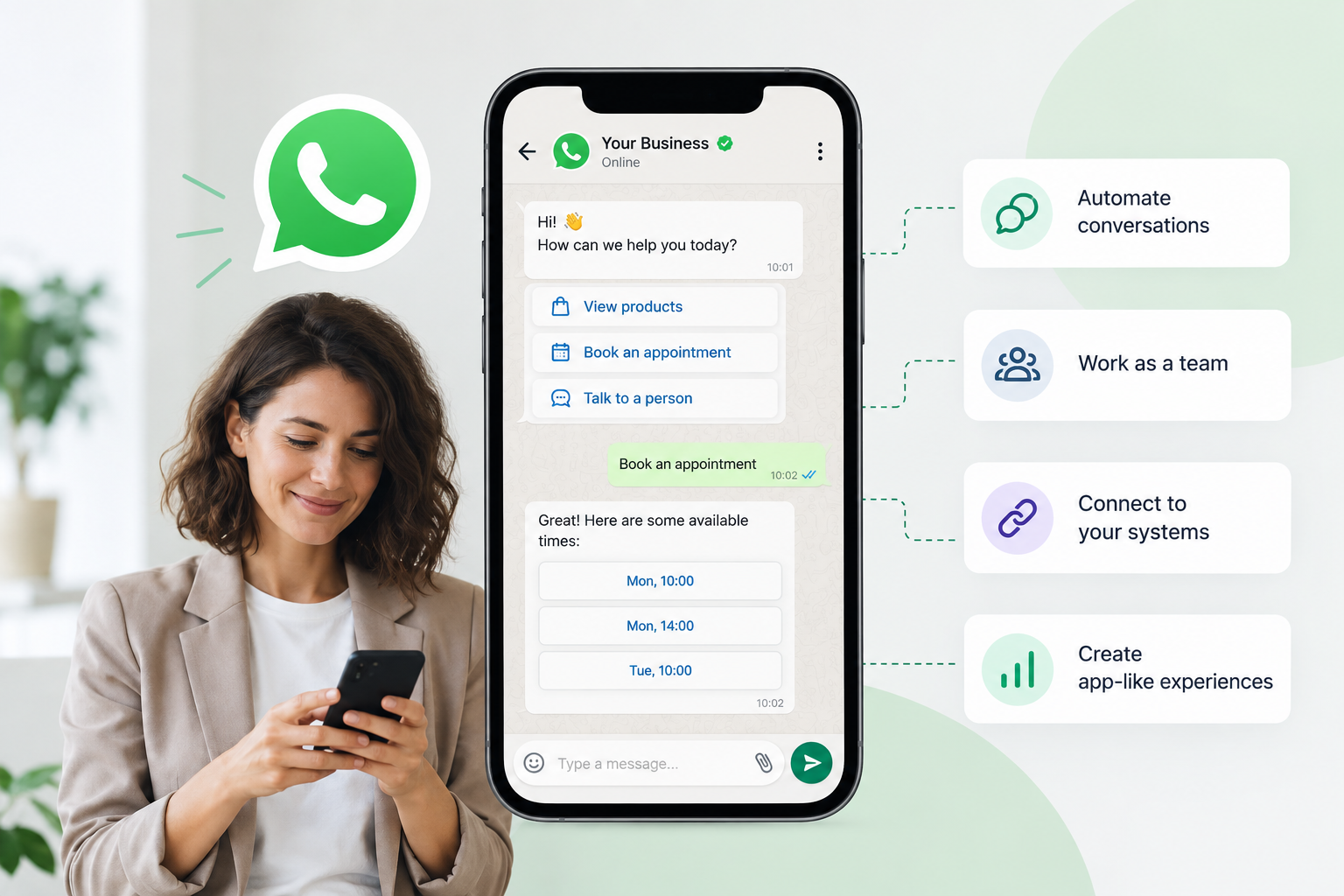
For many UK SMEs, WhatsApp is already part of everyday customer communication. But if you are thinking about using WhatsApp for your business, where do you actually start?
The first decision is understanding the difference between WhatsApp Business and the WhatsApp Business API.
The WhatsApp Business app is designed for straightforward customer conversations. The WhatsApp Business API is designed for businesses that want to go further — with automation, integrations, interactive experiences and communication managed at scale.
Understanding that difference is the first step to choosing the right solution for your business.
WhatsApp Business or WhatsApp Business API?
WhatsApp Business: the simple option
The WhatsApp Business app is the easiest way to start using WhatsApp for your business.
It works particularly well for small businesses where one person, or a small team, handles customer conversations directly from a phone.
You can create a business profile, display your opening hours and website, and communicate with customers through familiar WhatsApp chats. You can also use features such as quick replies, labels and product catalogues to make everyday communication easier.
If your main requirement is simply to give customers a way to contact you on WhatsApp, the app may be all you need.
WhatsApp Business API: when WhatsApp becomes part of your business
The WhatsApp Business API is designed for businesses that want to connect WhatsApp with their wider operations.
Instead of relying on one phone and manual conversations, the API allows WhatsApp to become part of your customer service, sales and operational processes.
For example, you can:
- Automate responses to common questions
- Send booking confirmations, reminders and updates
- Connect WhatsApp with your CRM or other business systems
- Let several employees manage customer conversations
- Create interactive messages with buttons, forms and other features
- Build automated customer journeys
- Provide personalised information based on data from your business systems
This is where WhatsApp becomes much more than a simple messaging inbox.
The WhatsApp Business API sounds complicated. It doesn't have to be.
One reason SMEs hesitate to explore the API is that it sounds technical.
There is a business account to set up, a phone number to verify, message templates to manage and technology that needs to connect with your existing systems.
But you don't necessarily have to build all of this yourself.
A business messaging solution provider can handle much of the technical infrastructure and make the WhatsApp Business API accessible through a ready-to-use solution.
That means you can focus on what you want WhatsApp to achieve for your customers rather than worrying about how to build the technology behind it.
When does an SME need the WhatsApp Business API?
There is no magic number of employees or customers that tells you when to move to the API.
The better question is: what do you want WhatsApp to do?
The app may be enough if you mainly want to:
- Answer customer questions manually
- Communicate with a relatively small number of customers
- Have one person or a small team manage conversations
- Provide a simple WhatsApp contact channel
The API becomes more interesting when you want to:
- Automate repetitive customer interactions
- Connect WhatsApp to your existing systems
- Send notifications automatically
- Manage higher volumes of conversations
- Create interactive customer journeys
- Give multiple employees access to customer conversations
- Use WhatsApp as part of your sales or customer service processes
In other words, the decision is less about the size of your business and more about the customer experience you want to create.
What can you do with the WhatsApp Business API?
Manage WhatsApp with a team
The API makes it possible for multiple people to work with customer conversations rather than having everything depend on a single phone.
That can make a big difference as an SME grows and customer enquiries become more difficult to manage manually.
Automate repetitive questions
Customers often ask the same questions again and again.
With automation, common requests can receive an immediate response while more complex conversations can be handled by a member of your team.
This can save time without making customer service feel impersonal.
Connect WhatsApp to your business systems
The real value of the API comes when WhatsApp is connected to the systems you already use.
For example, a customer could receive information based on data from your CRM, booking system, ecommerce platform or other business software.
Instead of simply sending a message, you can create a conversation that actually does something.
Send useful notifications
WhatsApp can also be used for proactive communication, such as:
- Booking confirmations
- Appointment reminders
- Delivery updates
- Order notifications
- Payment reminders
- Account updates
These messages can be triggered automatically, reducing the amount of manual work involved in keeping customers informed.
What is a WhatsApp Business provider?
If you search for WhatsApp Business providers in the UK, you will find different types of companies offering different ways to get started with the WhatsApp Business API.
One important distinction is whether the provider acts primarily as a technology provider or as a Meta Business Solution Partner.
Meta Tech Provider vs Meta Business Solution Partner
A Meta Tech Provider provides the technology that businesses need to use the WhatsApp Business API. The business maintains its direct relationship with Meta for WhatsApp messaging and is billed directly by Meta for its message usage.
A Meta Business Solution Partner can provide a more managed service, including handling the messaging relationship and billing on behalf of the customer. In this model, the provider typically invoices the customer for WhatsApp messaging and may add its own markup or service fees to the underlying Meta charges.
The difference matters when you compare pricing.
How RubiConnect works
RubiConnect is a Meta Tech Provider.
This means that RubiConnect provides the technology and business messaging solution needed to use the WhatsApp Business API, while the customer maintains its direct billing relationship with Meta for WhatsApp messaging.
Meta charges the customer directly for message usage. RubiConnect does not add a markup to Meta's messaging charges.
This creates a transparent separation between the two costs:
- Meta: charges you for WhatsApp messaging according to Meta's pricing.
- RubiConnect: charges for the technology and services you use to manage and build your WhatsApp business communications.
For an SME, this means you can see exactly what you are paying Meta for messaging and what you are paying RubiConnect for the solution itself.
It is an important point to check when comparing WhatsApp Business providers in the UK. A provider's pricing may look attractive at first glance, but you should always check whether a markup is being added to Meta's messaging charges.
For an SME, the transparency of knowing exactly what you pay Meta for messaging — separately from what you pay for the technology — can make the overall cost much easier to understand.
How do you choose a WhatsApp Business provider in the UK?
Not all providers offer the same experience, so it is worth looking beyond the basic ability to send WhatsApp messages.
When comparing providers, consider:
How easy is the setup?
Getting started should not require a major technical project.
Look for a provider that can guide you through business verification, phone number setup, templates and integration.
Can several employees manage the same number?
If customer conversations need to be handled by more than one person, make sure the solution supports your team structure.
What automation is available?
Ask what you can automate — and how easy it is to create and change those automations.
Can it integrate with your existing systems?
If you already use a CRM, booking system, ecommerce platform or other business software, check whether the provider can connect WhatsApp to it.
What interactive features are supported?
If your goal is to create a better customer experience, look beyond simple text messages.
Features such as interactive buttons, forms, product catalogues and WhatsApp Flows can help create more engaging, app-like experiences directly inside the conversation.
What support do you get?
For an SME without a large technical team, good onboarding and ongoing support can be just as important as the technology itself.
Who handles the WhatsApp billing?
This is easy to overlook.
Check whether you pay Meta directly for your WhatsApp messaging or whether the provider invoices you for messaging and adds a markup.
With a technology provider such as RubiConnect, your WhatsApp messaging charges are billed directly by Meta, with no RubiConnect markup on those charges.
This makes it easier to separate the cost of WhatsApp messaging from the cost of the business messaging solution.
What does WhatsApp Business API cost in the UK?
The cost of using the WhatsApp Business API depends on how you use it and which business messaging solution you choose.
There are two costs to consider:
- Meta's messaging charges, which depend on the type and volume of messages
- Your provider's fees, which may cover the platform, onboarding, support, automation and other services
The way these costs are billed depends on the type of partner you work with.
With a Meta Business Solution Partner, messaging charges may be included on the provider's invoice, potentially alongside a markup.
With a Meta Tech Provider such as RubiConnect, Meta bills the customer directly for messaging, and RubiConnect does not add a markup to those Meta charges.
That makes the pricing structure straightforward: you pay Meta for WhatsApp messaging and RubiConnect for the technology and services you use.
When comparing providers, therefore, look at the total cost of the solution, including both messaging and provider fees, rather than simply comparing a headline monthly price.
What about marketing?
WhatsApp can also be used for marketing, but businesses need to follow WhatsApp's rules around customer consent and business-initiated messaging.
For SMEs, the important principle is simple: customers should expect and agree to receive communications from your business.
If you plan to use WhatsApp for promotions, campaigns or other proactive communications, make sure your setup and messaging strategy comply with the applicable WhatsApp requirements.
Do I need a developer to use WhatsApp Business API?
Not necessarily.
The API itself is technical, but using it does not mean you need to become a software company.
A business messaging solution provider can take care of the technical elements and provide the tools needed to manage your WhatsApp communications.
This can be particularly valuable for SMEs that want the capabilities of the API without hiring a dedicated development team to build everything from scratch.
Start small
You do not have to automate your entire customer journey on day one.
A better approach is to start with one clear use case.
For example:
Customer support:Automate answers to your most common questions and make it easy for customers to reach a person when needed.
Bookings:Allow customers to request information, confirm bookings and receive reminders through WhatsApp.
Sales:Use interactive messages to help customers find products, request information or take the next step.
Notifications:Automatically send confirmations, reminders or updates that customers actually want to receive.
Once you have one successful use case, you can expand from there.
So, which WhatsApp solution is right for your business?
The WhatsApp Business app is a good starting point if you simply want to give customers a way to message your business.
But if you want to do more than chat, the API opens up a very different set of possibilities.
Think about the experience you want to give your customers.
Do you want a customer to be able to ask a question, check availability, receive a booking confirmation or get an order update — all without leaving the messaging conversation?
Do you want your sales or support team to have the information they need to respond quickly, while repetitive questions are handled automatically?
Do you want to impress your customers with an app-like experience inside a message, without asking them to download an app?
That's where the API becomes particularly interesting.
Choose WhatsApp Business if...
You mainly need a simple way for one person or a small team to communicate with customers.
You don't need complex automation, integrations or large-scale messaging.
The WhatsApp Business app may be all you need.
Choose the WhatsApp Business API if...
You want to improve the customer experience, not just add another way for customers to contact you.
You want to:
- Give customers faster, more convenient support
- Create interactive, app-like experiences inside a message
- Automate routine conversations while keeping human support available
- Connect WhatsApp to your CRM or other business systems
- Let several employees manage customer conversations
- Send useful notifications automatically
- Build WhatsApp into your sales, service or operational processes
The API turns WhatsApp from a messaging app into a business communication channel you can build experiences around.
And you don't have to build it yourself
This is where a business messaging solution provider such as RubiConnect comes in.
You get the capabilities of the WhatsApp Business API without having to develop and maintain the underlying technology yourself.
For an SME, that can be the best of both worlds:
The power of the API. The simplicity of a ready-to-use business solution.
Frequently asked questions
How do I get started with WhatsApp Business?
Start by deciding whether the WhatsApp Business app or the WhatsApp Business API is the better fit for your needs. The app is suitable for straightforward customer conversations, while the API is designed for businesses that need automation, integrations, team access or more advanced customer experiences.
What is the difference between WhatsApp Business and the WhatsApp Business API?
WhatsApp Business is an app designed for businesses to communicate directly with customers. The WhatsApp Business API allows businesses to integrate WhatsApp with their systems and build automated and interactive customer communication.
What is a WhatsApp Business provider?
A WhatsApp Business provider helps businesses set up and use the WhatsApp Business API, providing the technology, tools and support needed to manage business messaging.
What is the difference between a Meta Tech Provider and a Meta Business Solution Partner?
A Meta Tech Provider provides the technology needed to connect businesses to the WhatsApp Business API, while a Meta Business Solution Partner can provide a more managed service, including handling messaging billing.
With a technology provider such as RubiConnect, the customer is billed directly by Meta for WhatsApp messaging. RubiConnect charges separately for its technology and services and does not add a markup to Meta's messaging charges.
What are WhatsApp Business providers in the UK?
There are a range of WhatsApp Business providers serving UK businesses, from technology-focused providers to complete business messaging solutions. SMEs should compare setup, automation, integrations, interactive features, support, billing structure and overall cost before choosing one.
How much does WhatsApp Business API cost in the UK?
There is no single fixed price. Costs generally depend on Meta's messaging charges, the volume and type of messages you send, and the fees charged by your chosen business messaging solution provider.
If the provider is a Meta Business Solution Partner, its invoice may include Meta messaging charges plus a markup. With a Meta Tech Provider such as RubiConnect, Meta bills the customer directly for messaging, with no RubiConnect markup on those charges.
Do I need a developer to use WhatsApp Business API?
No. While the API itself is technical, a business messaging solution provider can handle much of the technical setup and provide a ready-to-use solution.
Can small businesses use WhatsApp Business API?
Yes. The WhatsApp Business API is not only for large enterprises. For an SME, it can be particularly useful when the business wants to automate customer communication, connect WhatsApp to existing systems or create a more sophisticated customer experience without building the technology internally.
Related Articles
Continue exploring more insights and guides
The Business Messaging Landscape in the UK: The Renaissance of the Native Inbox
The United Kingdom has established itself as one of the most mature, high-value, and compliance-driven digital economies in the world. As UK enterprises look to maximize customer lifetime value amid shifting economic conditions, the business messaging ecosystem is undergoing a dramatic paradigm shift. While in other countries the landscape is defined by near-total reliance on a single third-party application, the UK market is characterised by a fierce battle between over-the-top (OTT) ecosystems and the carrier-backed native inbox revival.

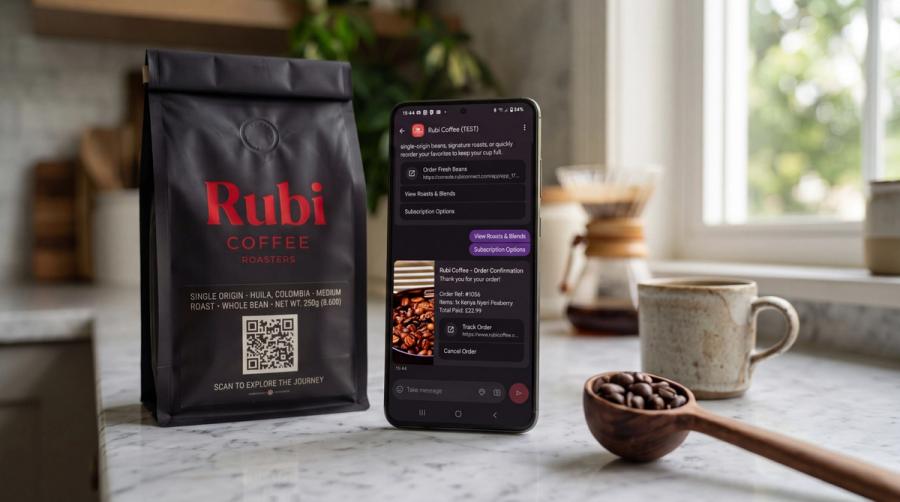
Conversational Commerce Without the Friction: The Rubi Coffee Playbook
How specialty roaster Rubi Coffee connected Shopify to WhatsApp and RCS with RubiApps to create a seamless, 24-second in-chat buying experience.

The October 1st Reckoning: Comparative analysis of Meta and RCS Business Messaging costs.
A comprehensive cost analysis of Meta new pricing model against the flat 24h conversational rate of RCS, across Spain, the UK, and Germany for Small (1,000), Medium (4,000), and Large (50,000) conversational volumes.